example.com). Ersetze sie durch deine eigenen Werte!
1. Die Umgebungsvariablen (.env)
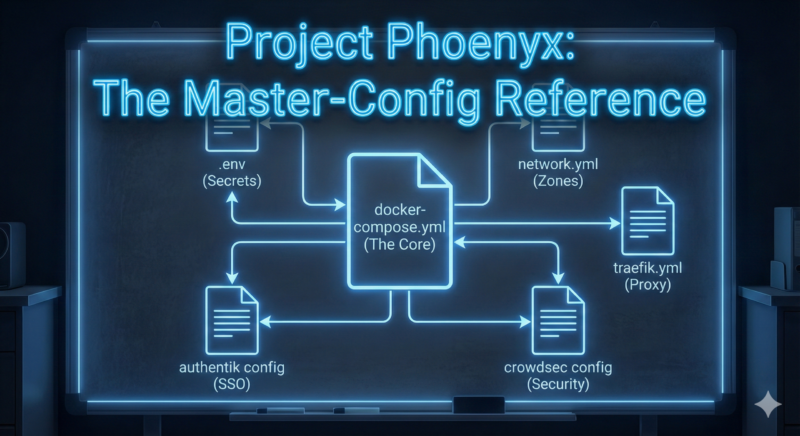
Wir speichern keine Geheimnisse direkt in den Compose-Dateien. Wir nutzen eine zentrale .env Datei im Root-Verzeichnis (/opt/containers/.env). Docker Compose lädt diese Datei automatisch und füllt die Variablen (${VARIABLE}) in den anderen Dateien aus.
# === PROJEKT PHOENYX HAUPT-KONFIGURATION ===
# Speicherort: /opt/containers/.env

# --- Domain Einstellungen ---
DOMAIN_NAME=example.com
ACME_EMAIL[email protected]

# --- Cloudflare (für DNS Challenge & Traefik) ---
CLOUDFLARE_DNS_API_TOKEN=dein-sehr-langes-cloudflare-token

# --- Crowdsec (Sicherheit) ---
# Generiert mit: docker exec -t crowdsec_lapi cscli bouncers add traefik-bouncer
CROWDSEC_LAPI_KEY=dein-generierter-bouncer-key

# --- MariaDB (Datenbank) ---
MYSQL_ROOT_PASSWORD=super-sicheres-root-passwort-bitte-aendern

# --- Authentik (Identity Provider) ---
# Generieren mit: openssl rand -base64 32
AUTHENTIK_SECRET_KEY=zufaelliger-string-fuer-cookies-und-sessions
POSTGRES_PASSWORD=sicheres-db-passwort-fuer-authentik
# Token aus dem Authentik Admin-Interface (Outposts)
AUTHENTIK_OUTPOST_TOKEN=token-vom-authentik-webinterface
2. Die Zentrale (docker-compose.yml)
Diese Datei steuert alles. Dank include bleibt sie extrem kurz.
Pfad: /opt/containers/docker-compose.yml
include:
  - ./networks/network.yml                  # Definiert die Infrastruktur
  - ./socket-proxy/socket-proxy-docker-compose.yml  # Schützt den Docker Daemon
  - ./traefik/traefik-docker-compose.yml    # Der Reverse Proxy
  - ./crowdsec/crowdsec-docker-compose.yml  # IDS / IPS Schutz
  - ./authentik/authentik-docker-compose.yml # SSO & Auth
  - ./mariadb/mariadb-docker-compose.yml    # Datenbank-Server
3. Das Netzwerk (network.yml)
Hier definieren wir unsere Sicherheitszonen mit festen IPs.
Pfad: /opt/containers/networks/network.yml
networks:
  # === INTERNE NETZE (Kein Internetzugriff!) ===

  authentik-internal:
    driver: bridge
    enable_ipv6: true
    internal: true # Isoliert!
    ipam:
      config:
      - subnet: 172.28.0.0/25
      - subnet: fd00:1:be:a:7001:0:1::/123

  database_internal:
    internal: true # Datenbank darf nicht nach draußen funken
    enable_ipv6: true
    ipam:
      config:
      - subnet: 172.28.0.128/25
      - subnet: fd00:1:be:a:7001:0:2::/123

  socket_proxy:
    internal: true # Nur für Traefik <-> Proxy Kommunikation
    enable_ipv6: true
    ipam:
      config:
      - subnet: 172.28.2.0/25
      - subnet: fd00:1:be:a:7001:0:5::/123

  # === KOMMUNIKATIONS-NETZE ===

  crowdsec:
    enable_ipv6: true
    ipam:
      config:
      - subnet: 172.28.1.0/25
      - subnet: fd00:1:be:a:7001:0:3::/123

  traefik_public:
    name: traefik_public
    enable_ipv6: true
    attachable: true # Erlaubt anderen Containern (WP, Nextcloud) den Beitritt
    ipam:
      config:
      - subnet: 172.28.1.128/25
      - subnet: fd00:1:be:a:7001:0:4::/123
4. Socket Proxy
Pfad: /opt/containers/socket-proxy/socket-proxy-docker-compose.yml
services:
  socket-proxy:
    image: tecnativa/docker-socket-proxy
    restart: always
    volumes:
      - /var/run/docker.sock:/var/run/docker.sock:ro # Read-Only Mount des Hosts!
    environment:
      CONTAINERS: 1 # Erlaubt Traefik das Lesen
      NETWORKS: 1
      SERVICES: 1
      POST: 0       # Verbietet Schreibzugriffe (Sicherheit!)
    networks:
      - socket_proxy
5. Traefik (Docker & Static)
Hier passiert die Magie. Traefik verbindet alles.
Pfad: /opt/containers/traefik/traefik-docker-compose.yml
services:
  traefik:
    image: traefik:latest
    restart: always
    environment:
      - CLOUDFLARE_DNS_API_TOKEN # Kommt aus der .env
      - CROWDSEC_LAPI_KEY         # Kommt aus der .env
    networks:
      - traefik_public
      - crowdsec
      - socket_proxy
    ports:
      - "80:80"
      - "443:443"
    volumes:
      - ./traefik.yml:/etc/traefik/traefik.yml:ro
      - ./acme/acme.json:/letsencrypt/acme.json
      - /var/log/traefik:/var/log/traefik
    labels:
      - "traefik.enable=true"

      # Dashboard Konfiguration
      - "traefik.http.routers.traefik.rule=Host(`traefik.example.com`)"
      - "traefik.http.routers.traefik.entrypoints=websecure"
      - "traefik.http.routers.traefik.tls.certresolver=letsencrypt"
      - "traefik.http.routers.traefik.service=api@internal"
      - "traefik.http.routers.traefik.middlewares=auth-traefik,crowdsec" # Doppelt geschützt!

      # Crowdsec Middleware Definition
      - "traefik.http.middlewares.crowdsec.plugin.crowdsec.crowdsecLapiUrl=http://crowdsec_lapi:8080"
      - "traefik.http.middlewares.crowdsec.plugin.crowdsec.crowdsecLapiKey=${CROWDSEC_LAPI_KEY}"
Die Statische Konfiguration: /opt/containers/traefik/traefik.yml
entryPoints:
  web:
    address: ":80"
    http:
      redirections:
        entryPoint:
          to: websecure
          scheme: https
  websecure:
    address: ":443"
    forwardedHeaders:
      trustedIPs: # Cloudflare IPs (gekürzt für Übersicht)
        - "173.245.48.0/20"
        - "103.21.244.0/22"
        - "..."

providers:
  docker:
    endpoint: "tcp://socket-proxy:2375" # Via Proxy!
    exposedByDefault: false

certificatesResolvers:
  letsencrypt:
    acme:
      email: "[email protected]"
      storage: "/letsencrypt/acme.json"
      dnsChallenge:
        provider: cloudflare
6. Crowdsec
Pfad: /opt/containers/crowdsec/crowdsec-docker-compose.yml
services:
  crowdsec:
    image: crowdsecurity/crowdsec:v1.7.3
    container_name: crowdsec_lapi
    restart: always
    environment:
      - COLLECTIONS=crowdsecurity/traefik crowdsecurity/http-cve
    networks:
      - crowdsec
    volumes:
      - ./config:/etc/crowdsec
      - ./data:/var/lib/crowdsec/data
      - /var/log/traefik:/var/log/traefik:ro # Liest Traefik Logs
7. Authentik
Pfad: /opt/containers/authentik/authentik-docker-compose.yml
services:
  postgresql:
    image: postgres:16-alpine
    environment:
      POSTGRES_PASSWORD: ${POSTGRES_PASSWORD}
    networks:
      - authentik-internal

  server:
    image: ghcr.io/goauthentik/server:2025.10
    environment:
      AUTHENTIK_REDIS__ENABLED: 'false'
      AUTHENTIK_POSTGRESQL__HOST: postgresql
      AUTHENTIK_POSTGRESQL__PASSWORD: ${POSTGRES_PASSWORD}
      AUTHENTIK_SECRET_KEY: ${AUTHENTIK_SECRET_KEY}
    networks:
      - traefik_public   # Für Web-Zugriff
      - authentik-internal # Für DB-Zugriff
    labels:
      - "traefik.enable=true"
      - "traefik.http.routers.authentik.rule=Host(`auth.example.com`)"
      - "traefik.http.routers.authentik.entrypoints=websecure"
      - "traefik.http.routers.authentik.tls.certresolver=letsencrypt"

  authentik-outpost-traefik:
    image: ghcr.io/goauthentik/proxy:2025.10
    environment:
      - AUTHENTIK_HOST=https://auth.example.com/
      - AUTHENTIK_TOKEN=${AUTHENTIK_OUTPOST_TOKEN}
    networks:
      - traefik_public
    labels:
      # Die Forward-Auth Middleware Definition
      - "traefik.http.middlewares.auth-traefik.forwardauth.address=http://authentik-outpost-traefik:9000/outpost.goauthentik.io/auth/traefik"
      - "traefik.http.middlewares.auth-traefik.forwardauth.trustForwardHeader=true"
      - "traefik.http.middlewares.auth-traefik.forwardauth.authResponseHeaders=X-Authentik-Username,X-Authentik-Email"
8. MariaDB
Pfad: /opt/containers/mariadb/mariadb-docker-compose.yml
services:
  mariadb-global:
    image: mariadb:11.3
    container_name: mariadb-global
    environment:
      - MYSQL_ROOT_PASSWORD=${MYSQL_ROOT_PASSWORD}
    networks:
      - database_internal # Isoliert!
    volumes:
      - mariadb-global-data:/var/lib/mysql
Sei der Erste der einen Kommentar abgibt